Calibration
Applies to release 3.18.1 · View source at the tag · Markdown
On this page
Bottom line: three kinds of calibration change the numbers the system works from:
- a moisture probe offset (and optionally a curve), so a probe reads what your handheld meter reads;
- a 2-point feed pH/EC calibration, so the feed-water probes read true in buffer solutions;
- a dosing pump calibration, so a pump without a flow sensor doses the right volume.
Each one is checked before it is applied, stored and written to the journal. A probe offset is also read back from storage after it is saved. Two of them hold things on purpose while they run, and that is safety-critical:
- While a feed probe calibration session is open, the probe sits in a buffer, so its reading is not used as the feed. Batches and pH auto-correct wait. In a room with a feed EC or pH band set, the source-water gate holds that room's shots until the session ends.
- If a dosing pump does not read off after a prime, calibration run or stop, the controller latches the room (CS-801). Its shots are held and the off is sent again every 2 s until the pump reads off. A latch from a prime or calibration run survives a controller restart; one from a stand-alone stop is held in memory only.
Where to do it today:
| Calibration | Dashboard | Services |
|---|---|---|
| Moisture probe offset (match handheld) | Equipment › Probes & offsets | crop_steering.probe_offset_set |
| Moisture probe curve | Shown read-only on Equipment › Probes & offsets | crop_steering.probe_offset_set (curve) |
| Feed pH/EC 2-point wizard | Equipment › Feed pH/EC calibration | crop_steering.calibration_start … calibration_commit |
| Feed probe check (judged only, never applied) | Equipment › Probes & offsets › Feed probe calibration | crop_steering.calibration_record |
| Dosing pump prime and calibrate | Equipment › Prime & calibrate a pump | crop_steering.pump_precheck, pump_prime, pump_stop, pump_calibrate, pump_calibration_commit |
An AI assistant or an automation can call the same services from Developer Tools › Actions in Home Assistant, with Return response ticked.
Who can do what
| Service | Who may call it |
|---|---|
calibration_get, calibration_status | Any signed-in user |
calibration_record, calibration_start, calibration_capture, calibration_commit, calibration_revert, calibration_abandon, probe_offset_set | Administrator |
pump_precheck | Anyone (it only reads) |
pump_stop | Any signed-in user, or an automation |
pump_prime, pump_calibrate, pump_calibration_commit | Administrator |
The MCP server reaches probe_offset_set only through a reviewed proposal (preview_probe_offset,
then apply_proposal, with writes enabled). It cannot start, capture or commit a feed calibration, and it cannot prime, calibrate or stop a pump.
Moisture probe offsets and curves
What an offset does
An offset is a number of percentage points added to one moisture probe's reading. Say your handheld meter reads 52 % at the same spot where the probe reads 49 %: the offset is +3.
The offset is applied before the zone's probes are combined (fused) into the zone's VWC. So it changes the VWC the engine steers on, the zone's dryback and every shot decision based on them. Watch the zone for a while after you change one.
Limits:
- An offset is between -20 and +20 points. A handheld match that needs more than 20 points is refused: the probe reads too far from the handheld, so check the probe and where it sits instead.
- The corrected reading must stay inside 0–100 %.
- Setting the offset to 0 with no curve removes the probe's entry.
A probe with an offset or a curve also gets its own sensor, sensor.<probe object id>_corrected
(for example sensor.f2_z1_vwc_a_corrected). It shows the corrected value in %, with attributes
source, raw, offset, curve and set_at. It goes unavailable while the raw probe is
unavailable, so an old value is never shown in its place.
Match a handheld meter (dashboard)
- Open Equipment › Probes & offsets and pick the room.
- Press Match handheld on the probe's row.
- Take a handheld reading at the same spot and depth as the probe, and type it in (0 to 100).
- The page asks the integration for a preview. It shows the offset it would set and what the zone would read with it. Nothing is saved yet.
- Press Apply +N offset to in the Review & apply bar. The write names the store's
revision. If someone changed the offsets meanwhile, it is refused and you reload. After the save,
the page reads the offset back with
calibration_get.
Curves
A curve turns a raw probe reading that is not moisture into moisture in %. Only a probe that reports dielectric permittivity can take one. Its unit must name ε, epsilon, permittivity or dielectric. A probe that already reports % is refused with "This probe already converts to moisture. A curve only applies to raw readings." Any other unit is refused as well.
Two curves exist:
| Curve | Fitted over | Worst error of the fit |
|---|---|---|
generic_soilless | permittivity 3–30 (coir and peat blends) | 0.42 points |
generic_rockwool | permittivity 10–60 (wet slabs) | 2.7 points |
Both are quadratic fits of the Topp et al. (1980) equation for mineral soil. They are generic approximations, not substrate calibrations. Every answer that sets a curve carries this warning. After you pick a curve, match a handheld meter so the offset corrects the reading at the moisture you steer around.
The dashboard shows the room's curve in use and why a curve does not apply, but it does not set
one. To set or clear a curve, call the service (curve: none clears it).
crop_steering.probe_offset_set
| Field | Required | Meaning |
|---|---|---|
room_id | yes | Canonical room id, for example room:abc123 |
entity_id | yes | One of the room's moisture probes |
offset | one of these three | Points, -20 to +20 |
match_handheld | Handheld reading 0–100. The offset becomes handheld minus the probe's bare reading. You cannot send it together with offset. | |
curve | generic_soilless, generic_rockwool, or none to clear | |
preview | no | true: answer with the effect and save nothing |
expected_revision | for a write | The revision a preview returned |
A preview answers offset, curve, corrected_now, fused_before, fused_after (what the
zone would read), excluded_after (probes the fusion would leave out, and why), diff and
revision. A write answers the same without preview and diff, with the new revision.
fused_before and fused_after are estimates. They mirror the zone's fusion without its learned
memory of the probes.
action: crop_steering.probe_offset_set
data:
  room_id: room:abc123
  entity_id: sensor.f2_z1_vwc_a
  match_handheld: 52
  preview: true
Each write is read back from storage. If the read-back does not match, the old value is put back
and the call fails with "The probe offset did not read back from storage. It was not applied."
A successful write is journaled as config.changed, with store: calibration and
section: probe_user_offsets, so it can be seen and put back from History › Changes.
Feed pH/EC 2-point calibration
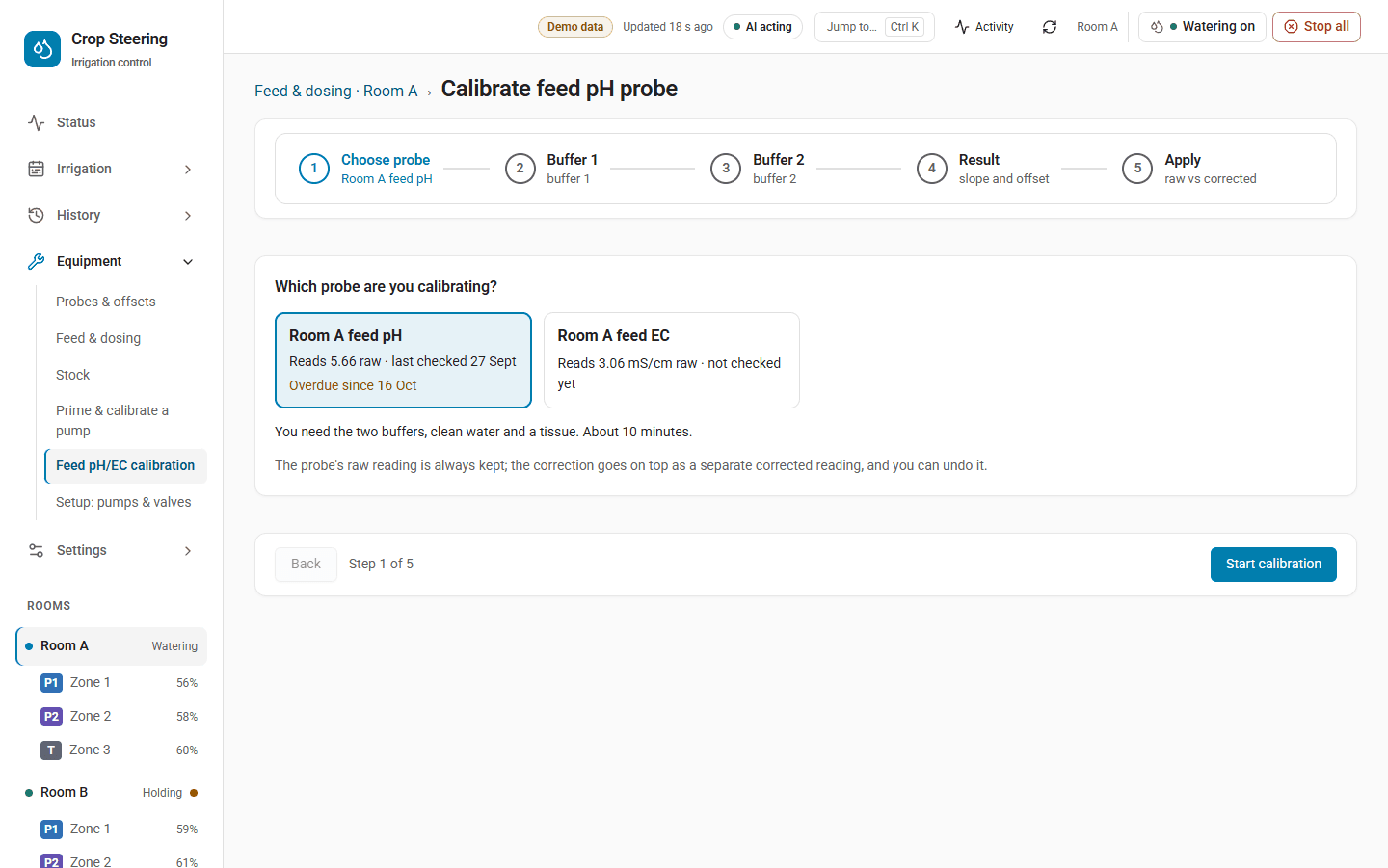
What it does
The wizard watches the room's raw feed pH or EC probe while it stands in two reference solutions. From the two points it works out:
- slope (%): 100 % means each step reads true;
- offset: how far the probe is out at the anchor (pH 7, or EC 0 mS/cm);
- a verdict: pass, drifting or fail.
| Verdict | Slope | Offset (pH units, or mS/cm) |
|---|---|---|
| pass | 95–105 % | within ±0.1 |
| drifting | 90–110 % | within ±0.3 |
| fail | anything else |
A commit applies a pass or drifting result. A fail is recorded but never applied. The call then fails with a message telling you to clean or replace the probe and calibrate again.
The raw sensors are never changed. Applying a calibration does two things:
sensor.crop_steering_<prefix>feed_ph_correctedandsensor.crop_steering_<prefix>feed_ec_correctedread the corrected value. They are unknown while no calibration is applied.- The room's
sensor.crop_steering_<prefix>engine_configcarriesfeed_calibration({ph|ec: {gain, bias, calibrated_at}}), the same correction asraw × gain + bias.
The controller reads the corrected sensor while it is live. Otherwise (for example right after a restart) it applies gain and bias to the raw reading itself. While a calibration is in force, the controller never uses the raw number uncorrected. It saves the calibration in its own state, so the correction holds even across a restart with Home Assistant down.
Default solutions and rules
| Probe | Default solutions | Smallest gap between them |
|---|---|---|
feed_ph | pH 7.0 and pH 4.0 | 1.0 pH |
feed_ec | 1.413 and 2.77 mS/cm | 0.5 mS/cm |
You can pass your own two values in solutions. They must be inside the probe's range (pH 0–14,
EC 0–20) and the minimum gap apart.
A point is captured only once the reading has held still for 30 s:
- pH: it moved less than 0.02 over the last 30 s;
- EC: it moved less than 1 % of its mean over the last 30 s.
A start is refused if the probe has not reported for 2 minutes ("No reading from the feed pH probe for 2 min. Check it's plugged in.").
Step by step (services)
- Start.
calibration_startwithroom_id,probe: feed_ph(orfeed_ec) and optionallysolutions. It answers withsession_id,solutions,raw_entity_id,temperature_entity_id(the room's tank temperature sensor, if one is set),dosing_paused: trueandexpires_at. A new start replaces any probe session already open in the room. - First solution. Rinse the probe and put it in the first solution (pH 7.0 by default). Poll
calibration_statuswith thesession_id. It answersreading,raw,stable,drift,stable_s,points_capturedandexpires_at. Status only reads: it never captures and never extends the session. - Capture point 0.
calibration_capturewithsession_idandpoint: 0. If the reading is not steady yet, nothing is stored. Under API v2 the call fails withguard_refused, "The reading is not steady yet: nothing was captured."force: truecaptures it anyway, and the point is markedforcedin the record. - Second solution. Rinse, move to the second solution, wait for
stable, then capturepoint: 1. - Commit.
calibration_commitwithsession_id. It answersrecord_id,slope_pct,offset,verdict,applied: trueand the storerevision. The session closes.
To stop without applying anything, call calibration_abandon with the session_id. A session also
ends by itself 30 minutes after its last start or capture. After that, every step answers
"Calibration session expired. Start again."
action: crop_steering.calibration_start
data:
  room_id: room:abc123
  probe: feed_ph
Putting one back
calibration_revert with room_id and probe takes the applied calibration off the probe and
puts back the one it replaced, if there was one. If not, the probe reads raw again. It also closes
any open probe session in the room. It answers reverted_record_id, record_id (the one now in
force, or null) and applied.
Due reminders
A calibration committed by the wizard, or a check saved with calibration_record, is due again
30 days later. A failed one does not reset the clock. When a probe is due:
binary_sensor.crop_steering_<prefix>calibration_dueturns on (attributesprobes,due_at);- a Repairs card is raised, CS-612.
Records made before this release have no due date and never go due.
The check on Probes & offsets is not the wizard
Equipment › Probes & offsets › Feed probe calibration saves a check made by hand with
calibration_record: you enter the two references and what the probe read in each, and it shows the
verdict. Such a record only judges the probe. It is never applied and does not change any
reading.
Safety: what waits while a session is open
While a feed probe session is open, the room's sensor.crop_steering_<prefix>dosing_config carries
calibrating ({probe, session_id, until}), and the controller treats that probe as sitting in a
buffer:
- Batches and pH auto-correct wait ("feed probe calibration in progress").
- A single dose by hand still goes ahead.
- Pump primes and calibration runs are refused (
pump_precheckblockercalibrating). - Shots: the source-water gate does not read the feed probe. If the room has a feed band set for that probe's quantity (EC or pH), the room's shots are held with reason "feed probe calibration in progress". There is no grace period and no rescue past it. Without a band, the gate is off and shots carry on.
- Fail-closed: if the room has a feed sensor and a feed band set for that quantity, and
dosing_configcannot be read while a calibration is applied to it, shots are held with "source-water pH/EC calibration state unreadable … holding (fail-closed)". Without a band, an unreadabledosing_configholds nothing.
Finish, abandon or let the session expire to release these holds. If you walk away, everything resumes within 30 minutes of the last capture.
Journal events
calibration.started, calibration.captured (each captured point, and each calibration_record
check), calibration.committed (with applied and superseded_record_id) and
calibration.reverted.
Dosing pump prime and calibrate
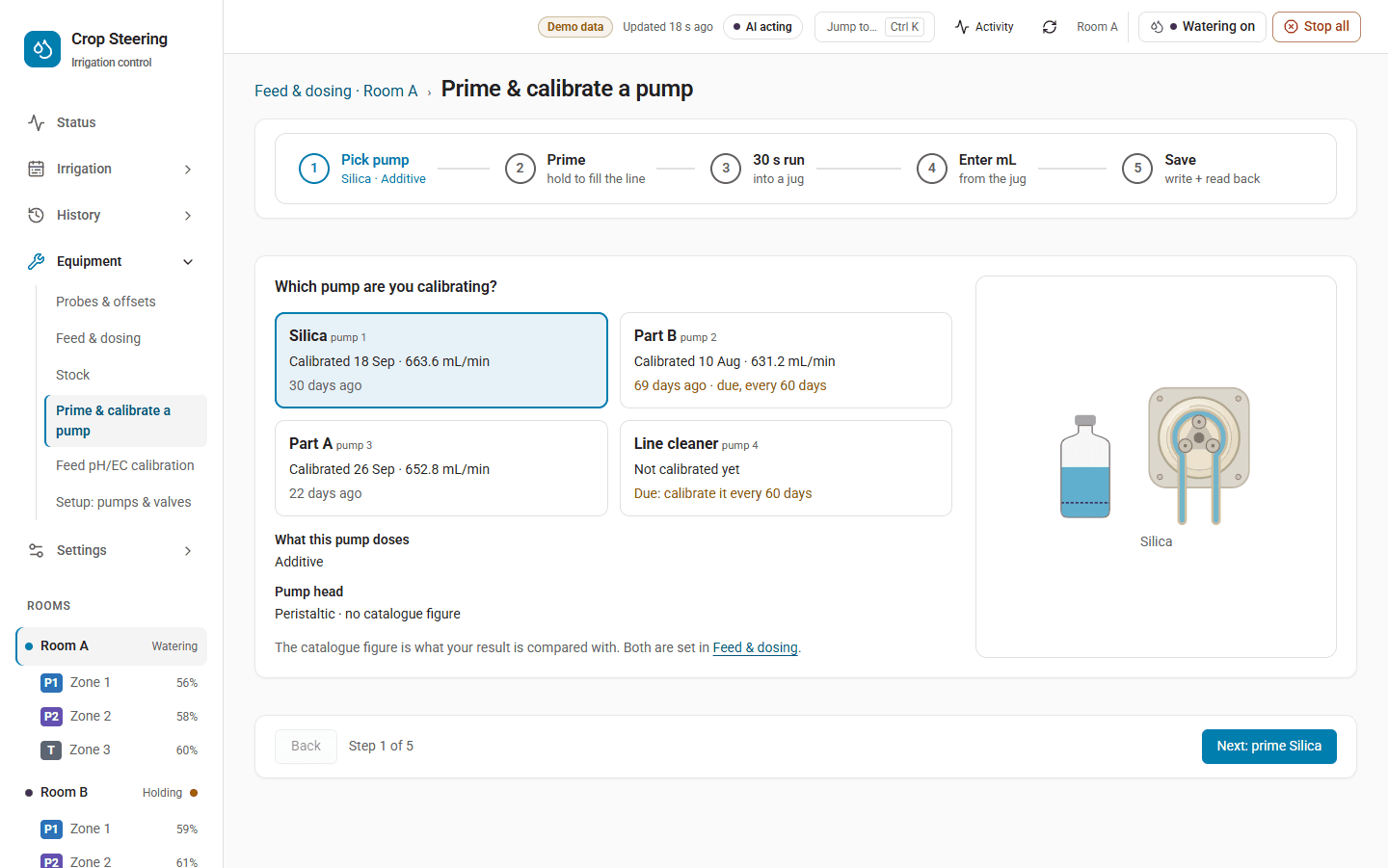
What it does
A prime runs one dosing pump's power switch for 1–30 s to fill its line. A calibration run
runs it for 5–120 s into a measuring jug. You then enter the mL it gave. That becomes the pump's
calibrated_ml_min, which is measured mL ÷ the seconds it actually ran × 60.
What the calibrated flow is used for:
- When the pump has no flow entity,
calibrated_ml_minis the flow doses are sized from. - When the pump's flow entity is a
numberorinput_number, the commit also sets it to the new flow in mL/s and reads it back (flow_entity_written). A flow entity always wins overcalibrated_ml_min. Asensorflow entity is never written.
A pump keeps its newest 30 calibrations, each with the previous flow.
The pump needs its own power switch (power_entity). Without one, or while that switch is
missing or unavailable, a timed run is refused.
Step by step (services)
-
Check.
pump_precheckwithroom_idandpump. It answers{ok, blockers}. Each blocker has acodeand amessage:Code Message no_power_entityNo power switch: a timed run needs the pump's own power switch (also raised when the switch is set up but its state is missing or unavailable)batch_runningRoom dosing is running mix_pump_onMix pump is on tank_fillingTank is filling calibratingFeed probe calibration in progress pump_calibratingAnother pump's calibration is still open controller_offlineController is offline controller_offlineis raised when the controller's heartbeat is older than 10 minutes. -
Prime (optional).
pump_primewithroom_id,pumpandseconds(1–30). The controller refuses a prime of a pump that has no usable flow yet (" is not calibrated"). On a new pump, calibrate first. -
Calibrate. Put the pump's outlet in a measuring jug. Call
pump_calibratewithroom_id,pumpandseconds(5–120). It answerssession_id,request_idandoutcome: requested. If a blocker stands, it answersoutcome: refusedwith theblockers(API v2:guard_refused). -
Wait for the run to end. The controller takes the request within 2 s, switches the power on, reads it back on, runs for the seconds asked and switches it off, then reads it back off. The time it ran (
ran_s) is reported insensor.crop_steering_<prefix>dosingunderhandled_results.dosing_getshows the open session withran_sandresult. -
Measure and commit. Read the jug. Call
pump_calibration_commitwithroom_id, thesession_idandmeasured_ml. It answersml_min,previous_ml_minandflow_entity_written. A commit before the run is reported is refused ("Wait for the pump to stop"), and so is one for a run that did not run.
A report restarts the session's 30 minutes, so you have time to read the jug.
action: crop_steering.pump_calibrate
data:
  room_id: room:abc123
  pump: part_a
  seconds: 60
Stopping a run
pump_stop with room_id and pump ends that pump's prime or calibration at its next 1 s check.
It switches the power off and reads it back. It never ends a batch, dose or pH correction (use the
room Stop for those).
A stop for a pump while another pump's request is still waiting is turned into a room stop, which switches off every pump. A waiting dose or batch can only be replaced by an administrator's or an automation's stop.
calibration_abandon ends a pump's calibration session early, but only after its run has been
reported. Before that, stop the pump first.
What a timed run is refused for, or stopped by
A run does not start while:
- a dosing hardware fault is latched (CS-301);
- a shot is in flight in the room;
- a batch holds the room;
- another hold is open (a feed probe session, or another pump's calibration or prime);
- the room's kill switch is off.
A request older than 120 s is never acted on.
During the run, the controller checks every second and stops the run if the kill switch goes off, a hardware fault latches or a shot starts in the room.
What waits while a run is open
- While a pump's calibration session is open, and for a prime's run plus 60 s after it is
reported,
dosing_configcarriescalibratingwith that pump. - Doses and batches are refused: "A dosing pump is being calibrated or primed: doses and batches wait until it is done".
- Primes and calibrations of other pumps are refused.
- Shots are not held by an open pump session. A pump-only entry does not touch the source-water gate.
A run that went into the jug is not counted as stock drawn from the tank.
CS-801: a pump that does not read off
After every prime, calibration run or pump_stop, the controller switches the pump's power off
and reads it back. If it does not read off at the end of a prime or calibration run the
controller was running:
- the run is reported as
stuck(ran_s: 0) and journaled asdose.completedwith outcomefailedand codeCS-801; - a critical alert is raised, CS-801 (Dosing pump overrun), titled "a dosing pump does not read off after a prime" or "… after a pump calibration";
- the room is latched: its shots are held with the reason "dosing hardware still on: ", and new doses, batches and timed runs are refused;
- the controller sends the off again every 2 s and repeats the alert every 30 minutes, titled "a dosing pump does not read off";
- the latch is written to the controller's
dosing_state.json, so it holds across a controller restart.
A pump_stop with no timed run going works differently. If the pump does not read off, the stop
answers "stopped; does not read off" (not stuck), no dose.completed is journaled, and
the alert is titled "a dosing pump does not read off after a stop". The room is latched the same
way, but only in the controller's memory: nothing is written to dosing_state.json, so that
latch does not survive a controller restart.
The latch clears by itself once the power reads off. Then the room waters again. The room Stop sends the off again too. If the pump is still running, switch it off by hand, and check the tank before the next dose.
Journal events
dose.completed (with data.kind prime or calibrate, seconds, ran_s and result:
done, stopped, stuck or refused: …), pump.primed (journaled for every prime, with outcome
refused or aborted when it did not run; the pump's primed_at is stamped only when ran_s is
above 0)
and pump.calibrated (with ml_min, previous_ml_min, run_s and measured_ml). The pump's
history in sensor.crop_steering_<prefix>dosing lists each prime and calibration.
For the controller's side of a timed run, see DOSING.md › A timed run.