History, changes and putting things back
Applies to release 3.18.1 · View source at the tag · Markdown
On this page
Bottom line: Crop Steering keeps one event Journal for the whole site. It records every shot, hold, phase change, alert, dose, AI action and setting change. Three pages read it: History › Changes (who changed what, with a button to put a change back), Irrigation › Timeline (what each zone did and is planned to do) and History › Explorer (readings with phase and shot lanes). Watering never depends on the Journal. If the Journal cannot open, shots carry on, and only these pages and services report "unavailable".
Putting a change back is safety-checked in the same way as the original change. It is refused if the value has moved since, it goes through the store's own save path, and it reads the value back before saying it is done. Only a Home Assistant administrator can put a change back.
Needs an integration that has the Journal (journal_query, history_changes, timeline_get). The
dashboard calls this "Crop Steering 3.18 or newer". Note that the integration manifest in this tree still
reports version 3.17.0, so check for the services rather than the version number. On an older
integration the Changes page falls back to the selected room's setting log (see
On an integration without the Journal). The whole Timeline page
is replaced by a "Needs integration 3.18" panel.
The Journal
What it records and where it lives
- One SQLite file for the site:
<config>/crop_steering/journal.db. It opens with the first room and stays open while any room is loaded. It opens in the background, so setup and room reloads never wait on it. - Each event belongs to one room (
room_id, such asroom:f2_) and gets the next sequence number (seq) for that room. - Both halves write to it:
- The integration writes setting changes, saved store sections, put-backs, alerts from rules and acknowledgements.
- The controller (the add-on) writes shots, holds, queues, phase changes, doses, flow checks and
AI outcomes. It appends each event as a line to
journal_outbox.jsonlbeside its state file, then sends the file tocrop_steering.journal_appendafter each control pass. Writing that line is the only thing a shot waits for, and it is never synced to disk. A power cut can lose ashot.startedline, but the shot still runs.
journal_appendkeys on the eventid, so the same event sent twice is stored once. An event that is not well formed is rejected on its own. The controller moves it tojournal_dead.jsonl(keeping the newest 500), so it never blocks the others. The outbox is trimmed only when it is flushed: if more than 5000 events are pending then, it keeps the newest 4500 (it can hold more than 5000 between flushes). After a trim the controller queues its own history again with the same ids, but that is only dosing history and AI ledger rows. Live events the trim dropped (shots, holds, phase changes and so on) are not sent again and are lost.
Retention
The Journal is pruned when it opens and then once a day. Events whose kind starts with shot.,
intent. or flow. are deleted after 400 days. Every other kind (setting changes, plans,
calibrations, alerts, AI outcomes, stock, harvests) is kept.
History from before the Journal (backfill)
On the first start with the Journal, each room's older records are imported once as Journal events. That is why History › Changes shows changes from before the Journal existed.
| Old record | Imported as |
|---|---|
| Setpoint log (who changed which setting) | target.changed |
| AI overlays still held | target.changed on the overlay layer, with the overlay's expiry |
| Stock history | one stock.drawn per tank |
| Probe calibration checks | calibration.captured (a check only, nothing applied) |
| Controller dosing history and AI ledger | sent by the controller, up to 200 events per pass |
Imported events have source.detail set to backfill and ids derived from the old rows, so a run that
is cut short and repeated adds nothing twice. Each source is marked done on its own (meta key
backfill:<room>:<source>:v1). A source that is missing or fails to load is tried again on the next
start. Imported events are not re-fired on the bus. One known limit: an AI overlay that has already
ended is not stored anywhere, so its change imports as an ordinary (base) change.
The event
Every event has this shape (version 1). room_id and seq are added when it is stored.
{
  "v": 1,
  "id": "01JBD3K6Z9Q8W1V2X3Y4Z5A6B7",
  "ts": "2026-10-22T08:15:02.120+13:00",
  "room_id": "room:f2_",
  "seq": 18452,
  "zone": 3,
  "kind": "target.changed",
  "outcome": "ok",
  "code": null,
  "source": {"actor": "manual", "detail": null, "program_id": null,
             "user_id": "9f2c…", "judge": null, "client": null},
  "correlation": {"intent_id": null, "causation_id": null, "batch_id": null, "run_id": null,
                  "plan_revision": null, "setup_revision": null, "proposal_token": null,
                  "ledger_id": null},
  "data": {"key": "p2_vwc_threshold", "scope": "zone:3", "layer": "base",
           "old": 52, "new": 50, "expires": null, "reason": null, "expected": null,
           "entity_id": "number.crop_steering_f2_zone_3_p2_vwc_threshold"},
  "readback": null
}idis a ULID, so ids sort by time.outcomeis one ofok,queued,held,refused,aborted,failedorpartial.source.actoris one ofengine,timer,plan,manual,ai,learner,safety,mcp,aigrow,automationorsystem.
For a service call, the actor is chosen this way. A client of mcp or aigrow names the actor. A
signed-in user with no client is manual. A call with no user is automation. This is the same rule
the setpoint log used.
Event kinds
| Group | Kinds |
|---|---|
| Watering | intent.queued, intent.held, intent.refused, shot.started, shot.completed, shot.aborted, flow.reconciled, phase.changed |
| Settings | target.changed (one setting), config.changed (a saved store section) |
| Grow plan | plan.saved, plan.armed, plan.activated, plan.disarmed, plan.expired |
| Calibration | calibration.started, calibration.captured, calibration.committed, calibration.reverted, pump.primed, pump.calibrated |
| Feed and stock | dose.completed, batch.step, batch.completed, batch.failed, stock.drawn, stock.refilled |
| Alerts | alert.raised, alert.cleared, alert.acknowledged |
| AI | ai.judgement, ai.outcome |
| Runs | run.saved, run.archived, harvest.recorded |
These data fields are the ones the dashboard reads:
target.changed:key,scope(roomorzone:N),layer(base, oroverlayfor an AI overlay),old,new,expires,reason,expectedandentity_id.config.changed:store,section,old,newanddiff. The whole section is stored before and after.shot.started:commanded_l,duration_s,reason,phase,vwc_before,vwc_expected,requested_atandpump_wait_s.shot.completed:commanded_landmetered_l.flow.reconciled:metered_l. It is tied to its shot bycorrelation.intent_id.calibration.committed:probe,record_id,superseded_record_id,verdictandapplied.pump.calibrated:pump,ml_minandprevious_ml_min.
Reading it: crop_steering.journal_query
Any signed-in user can call it. It returns a response (return_response).
| Field | Required | Meaning |
|---|---|---|
room_id | yes | room:f2_ |
since | yes | ISO time, inclusive |
until | no | ISO time, exclusive |
kinds | no | list of kinds, such as ["shot.completed", "alert.raised"] |
zones | no | list of zone numbers |
actor | no | one actor, such as ai |
limit | no | 1 to 500 (default 500) |
cursor | no | the cursor from the previous page |
The answer is {events, cursor}, oldest first. cursor is null on the last page. The call also
takes the common API fields (api, client, proposal_token). With api: 2, the answer comes in the
API v2 envelope.
action: crop_steering.journal_query
data:
  room_id: "room:f2_"
  since: "2026-10-22T00:00:00+13:00"
  kinds: [shot.completed, shot.aborted]
  zones: [3]
response_variable: shots
crop_steering.journal_append is the controller's way in. It is admin only, takes at most 50 events
per call, and answers {accepted, duplicate, seq_max, rejected}. Automations should not need it.
Following it live (automations)
Every event that is stored live is fired on the Home Assistant bus as crop_steering_event, with
the event as its data. Backfilled events are not fired. Here is an example automation trigger:
trigger:
  - trigger: event
    event_type: crop_steering_event
    event_data:
      kind: shot.aborted
      room_id: "room:f2_"
A signed-in user who is not allowed to subscribe to custom bus events can use the websocket command
crop_steering/subscribe instead. It takes an optional rooms list and an optional kinds list.
Each matching event arrives as {"id": <your id>, "type": "event", "event": {…}}. The command answers
unauthorized with no signed-in user, and unavailable only when the Journal hub was never set up. If
the Journal failed to open, the subscription still succeeds but never delivers events. The dashboard
subscribes in this way. Without a websocket, it calls journal_query every 30 s while the page is
visible.
History › Changes
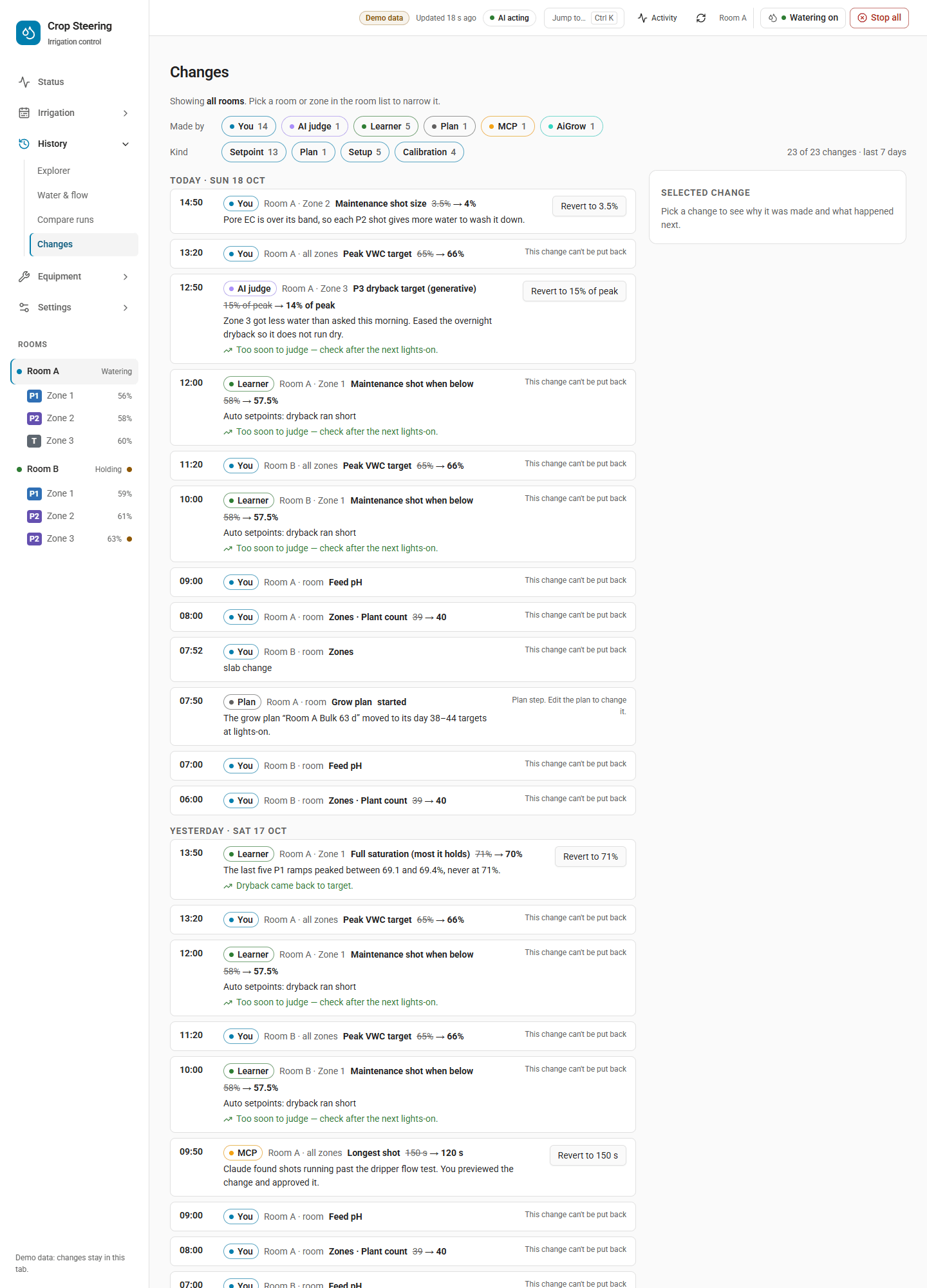
This page answers who changed what, when, from what to what, why, and how it worked out. Open it from
History › Changes (#/history/changes).
What appears
| Kind chip | What it covers | Journal source |
|---|---|---|
| Setpoint | One setting on the room or a zone: a number, or a switch or select such as zone enable, the room kill switch, growth stage, P2 mode or watering-by | target.changed |
| Recipe | A setting written by a preset, a copy or a recipe | target.changed with source.detail starting preset or copy from , or containing recipe |
| Setup | A saved section: room setup, water supply, presets, timer programs, dashboards | config.changed |
| Calibration | Probe offsets, feed-probe calibrations, dosing pump rate | config.changed (store calibration), calibration.committed/reverted, pump.calibrated |
| Plan | Grow plan saved, armed, started, stopped or ended | plan.* |
| Alerts | The alert rules | config.changed, section alert_rules |
Shots, holds, doses and alerts are not changes and do not appear. Find them on the Timeline or in the Explorer.
Reading the page
-
Period. The page shows the last 7 days. Scroll to the end, or press Show the 7 days before …, to read the week before. At most 2000 changes are read per period, the newest first. If more exist, the page says "Showing the newest 2000 changes of this period."
-
Scope. All rooms by default. Pick a room or zone in the room list to narrow it, and press Show all rooms to widen it again. A site-wide change (supply, presets, dashboards) is one row, scoped "All rooms", even when the save touched several rooms.
-
Filters. The Made by chips can be You, Learner, AI judge, Timer, Plan, MCP, AiGrow, Safety, Automation, Setup and Engine, and the Kind chips are those listed above. A chip is drawn only when the loaded rows contain that maker or kind, or it is the one selected, so not every chip is always shown. Each chip shows its count. "You" means any signed-in person. The panel names them when Home Assistant knows the user.
-
Each row shows the time, who made the change, where, the setting, was → now, the reason, and how it worked out.
-
Selected change panel. Pick a row to see:
- who made it and when;
- a was/now bar on the setting's own range. If the setting has moved since, the panel shows "Set to" and the value "Now";
- the limits a learner or AI change had to stay within;
- Why (the recorded reason);
- What happened next.
On a phone (720 px wide or less), the panel opens under the row.
What happened next
Only changes made by the learner or the AI judge are judged. The judgement comes from the controller's
ai.outcome event for the same ledger row, recorded at or after the change:
| Shown | Meaning |
|---|---|
| Dryback came back to target. | The outcome was judged good |
| No change in dryback yet. | The outcome was judged not good |
| Too soon to judge — check after the next lights-on. | No outcome yet |
Every other change reads "Only learner and AI judge changes are judged afterwards."
crop_steering.history_changes
Any signed-in user can call it. It returns a response.
| Field | Required | Meaning |
|---|---|---|
since | yes | ISO time |
until | no | ISO time |
room_id | no | one room; every room when left out |
zone | no | only changes scoped to zone:N |
key | no | one setting key, such as p2_vwc_threshold |
kinds | no | any of setpoint, plan, recipe, setup, calibration, alerts |
The answer is {changes, truncated?}, newest first, at most 2000 rows. Each row has these fields:
idandevent_id(the Journal event),room_idandts;actor,detail,user_idanduser_name;kind,key,sectionandscope(room,zone:Norsite);oldandnew;reason;outcome(the sentence above, ornull);limits({writer, min, max, step_scope}for a learner or AI setting change);revertible;causation_id.
Rows are ordered by time, not by seq, because backfilled rows get later sequence numbers.
Putting a change back (revert)
Press the row's button or the panel's button. The label says what it will do: Revert to 52%, Put back the previous version, Restore previous calibration or Put back in reading. A change that cannot be put back shows the reason in place of a button.
Who can
Only a Home Assistant administrator. Anyone else gets "Only a Home Assistant administrator can put a change back."
What can be put back
A change can be put back only if its own outcome was ok (or was not recorded) and it is one of
these. A store-section change also needs its old copy (data.old) to have been recorded.
| Change | Can be put back when | What putting it back does |
|---|---|---|
A setting (target.changed) | It is a base-layer change with an entity_id and both an old and a new value | Writes the old value and reads it back |
| Room setup | The old copy was recorded (section setup / room). Refused if the old copy lacks a part the room has now | Saves the old setup through setup_save, with all its safety checks |
| Water supply | The old copy was recorded (site / supply) | Saves the old supply and reads it back |
| Presets | The old copy was recorded (site / presets) | Saves the old preset list |
| Timer programs | The old copy was recorded (timers / programs) | Saves the old programs. A program the change deleted comes back under a new id |
| Probe offsets | The old copy was recorded (calibration / probe_user_offsets) | Sets each changed probe's old offset and curve again, and reads each one back |
| A committed calibration | It was applied and no later commit or revert of the same probe replaced it | Reverts that probe to the calibration it replaced, or to none |
These cannot be put back:
- Plan steps. The row says "Plan step. Edit the plan to change it."
- An AI overlay (keep or undo it on the zone page).
calibration.revertedandpump.calibratedevents.- Dashboards.
- Alert rules.
- Timer skips.
- Any change whose recorded outcome was something other than
ok. - A store-section change with no recorded old copy.
When it is refused
| Message | Why |
|---|---|
| This has changed again since. Reload the history and check it before trying again. | The setting or section no longer holds the value this change set (stale_revision). Something changed it again. Put back the newer change first, or set it by hand |
| The controller refused: Keep or undo the AI change first | An AI overlay holds this setting now |
| This change can't be put back | The change is not in the table above. Or, for room setup, the old copy lacks a part the room has now (such as plumbing or a tank level), and a put-back never half-applies |
| The controller refused: Not put back: … | The write was sent but did not read back. The service turns this into a guard_refused failure |
What it records
A put-back is a new change. It is journaled as manual with detail put back. Its causation_id is
the event it reverses, and its row reads "Put back from History." On success, the page shows Written
and read back HH:MM and offers Undo: write back the value it had.
crop_steering.history_revert
This service is admin only. A response is optional.
| Field | Required | Meaning |
|---|---|---|
event_id | yes | the change's event_id from history_changes |
expected_revision | no | for a store section: refuse unless the store is still at this revision |
The answer is {reverted_event_id, new_event_id, readback, error?}. Some changes add fields:
- probe offsets add
entities, the per-probe read-back; - timer programs add
renewed: [{name, old_id, id}].
readback is verified or refused. With api: 2, a refused read-back comes back as ok: false,
code guard_refused, "Not put back: …".
Undo rules across the dashboard
Pages that make a change you can reverse show a 10-second toast with Undo, in place of a confirm
dialog. Most Undos put back the Journal events that change wrote, so the rules above apply (admin
only, refused if the value moved since, read back). Some do not go through history_revert and its
admin-only check:
- Stock refill. Undo calls
stock_refillagain with the level before the refill. - Timer zone mode. Undo writes the zone's mode entity back directly.
- Deleting an alert rule when no Journal events came back: Undo saves the rule again.
For Undos that do use the Journal:
- Order. Events are put back newest first. Undo stops at the first refusal and says how far it got: "2 of 3 put back: …".
- Done means read back. An Undo counts as done only when every value read back. A value that does not read back is refused, and the error toast shows the raw "Not put back: …" message.
- No silent success. A refused Undo shows the reason in an error toast. Nothing reads as undone when it was not.
- Two known gaps. Skip this shot on the Timeline and saves on Settings › Alert rules also offer
Undo. The Journal does not count timer skips or alert-rule changes as revertible (
changes.pyREVERTIBLE_SECTIONS), so that Undo is refused with "This change can't be put back". A skip expires by itself 15 minutes after the shot's time. Change an alert rule back by editing it.
Irrigation › Timeline
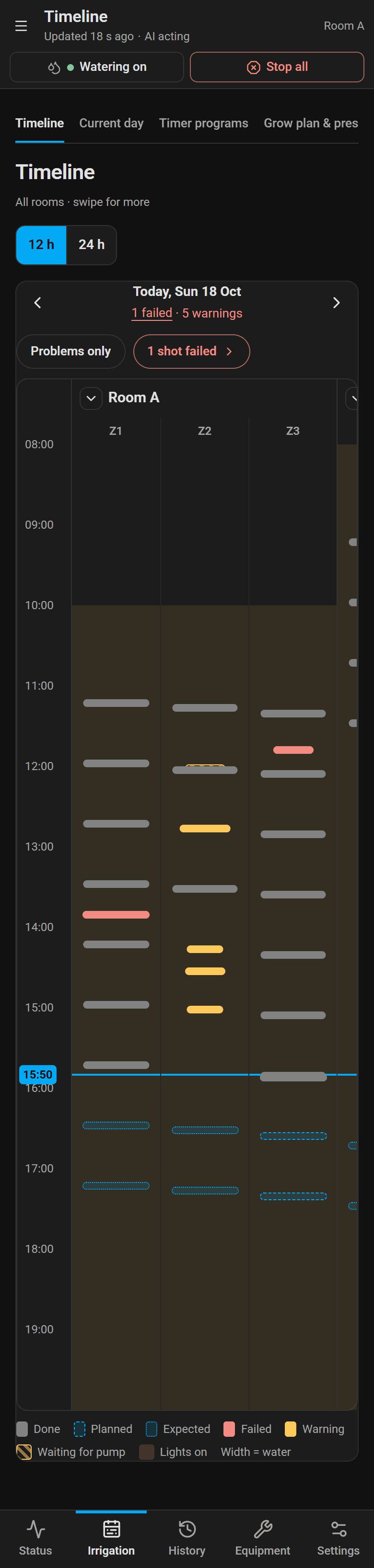
#/plan/watering. This page shows, for every room at once, what each zone did and what it is planned
to do. Each room has a header row, then one row per zone.
Reading it
| Block | Meaning |
|---|---|
| Done | A shot that completed. "Watering now" while it is running |
| Failed | A shot that was aborted or failed. The zone and room rows turn red. A held intent (a shot the safety guards stopped) is drawn with the same failed mark, but the controller gives it warning status, so it is not counted in "N shots failed" or in the day strip's "N problems" |
| Warning | A partial shot, a shot with no completion past its expected end plus 120 s, or an alert. The rows turn amber |
| Waiting for pump | A queued intent: the zone waited its turn on a shared pump |
| Planned | A future shot from the controller's plan (timer or steering engine) |
| Expected | A future shot the steering engine expects, but which depends on the readings |
| Skipped | A planned slot that has been skipped, drawn faded and struck through |
| Lights on | The room's lights windows behind the blocks |
Tap a block to see more:
- Water. Per plant, and "X L arrived of Y L". Arrived is the metered litres (from the shot's own meter reading, or the flow check that followed it). The second figure is the commanded litres. Per plant uses the metered litres when they exist.
- VWC. Before (or now, for a planned shot) → expected.
- Status line. For example "Done · waited 12 min for pump" when the shot queued for a shared pump.
- Reason, source and alert code, where recorded.
Planned and expected blocks come only from the controller's projection_app sensor, and only for
times after now. If the controller has not published one, the room shows "Planned shots not available
from the controller". Past blocks still show.
Controls
- Day strip. A week of days around the chosen date. Each day reads Done, Planned or "N problems" (failed plus warnings; held intents are counted separately and are not included, so a day with only held intents can show red rows but no problems). Today returns to today.
- Hours shown. 12, 24 or 48 h. A phone offers 12 and 24 h and pages day by day.
- Filters.
- Flower rooms and Veg rooms chips.
- Problems only keeps rooms with a failed or warning block.
- N shots failed steps through the error blocks (aborted or failed shots, not held intents).
- A search narrows the rows:
z3for zone 3, or a room name.
- Block buttons. Open Room A Zone 3 opens the zone page. See what happened (on a failed shot) opens History › Explorer for that zone. Skip this shot appears on a skippable planned shot.
- Live updates. The page refreshes 2 s after a new shot or intent event arrives. While the connection is down it shows "Live updates paused — reconnecting".
Skip this shot
A skip writes to the room's timer store (crop_steering.timer_skip) at its current revision.
- Timer shot. The skip covers that one slot.
- Steering engine shot. The skip covers 15 minutes from the shot's time.
- Limits. The time must be no more than 24 h ago and no more than 48 h ahead ("That time is more than 48 h ahead").
- If it is refused. If the timers changed since you opened the page, the skip is refused with "The timers changed since you opened this. Try again."
See the known gap on Undo above.
crop_steering.timeline_get
Any signed-in user can call it. It returns a response.
| Field | Required | Meaning |
|---|---|---|
rooms | yes | list of room ids, such as ["room:f1_", "room:f2_"] |
start / end | yes | ISO times. The span is at most 48 h. A time without an offset is read in Home Assistant's time zone |
zones | no | only these zone numbers |
The answer is {rooms, errors, truncated?}, with times in Home Assistant local time.
Each room has these fields:
room_id;lights:[{on, off}];rows:[{zone, blocks}];pump;pump_rooms: every room on the same pump;pump_load:[{t, pct}], the running zones' demand over the pump'smax_flow_lph. This is the pump's total across every room on it.pctisnullwhen the capacity or a zone's demand is not set in the supply;planned_source:projection_apporunavailable.
Each block has these fields:
id,kind(shot,held,queued,alertorplanned) andstatus(done,error,warningorplanned);startandend;litres(commanded) andmetered_l;reason,phase,vwc_before,vwc_expected,requested_atandpump_wait_s;source,codeandevent_id;skippable,skipped,expectedandrunning.
errors is {count, markers: [{room_id, zone, t, code, block_id}]} for every error block. At most
5000 blocks are returned, the newest. If more exist, truncated: true is set.
crop_steering.timeline_summary
Any signed-in user can call it. Give rooms and days (up to 14 dates, YYYY-MM-DD). The answer is
{days: [{date, rooms: [{room_id, shots, failed, warnings, held, queued}]}]}. Each block is counted on
the local day it started. failed counts error blocks. warnings counts warning shots and alerts.
Held and queued intents have their own counts.
History › Explorer
#/history/explorer. This page shows the room's readings on stacked charts, under phase and shot lanes,
with one crosshair across all of them. The choice of range is Today, 7 d, This run or Custom.
The lanes come from the Journal. They show phase.changed, shot.completed and alert.raised, up to
5000 events per range. Past that, only the newest are shown. Without the Journal the phase lane is drawn
from the zone's phase sensor as Home Assistant recorded it.
- Pick a zone in the room list to add its probes, its targets and its other grows below the room charts.
- AI assistant decisions lists the AI decisions that acted, with how each turned out.
- Export CSV downloads the series that are charted.
Old links to the activity, log and timeline pages open here. Setting changes are on History › Changes.
On an integration without the Journal
The dashboard labels this case "3.17" and the Journal-capable one "3.18".
- History › Changes reads the selected room's setting log (
setpoint_log_get) and shows setting changes only. The other kind chips say "Needs Crop Steering 3.18 or newer". To see another room, pick it in the room list. - Putting a setting back. The dashboard writes the old value again with read-back, but only while the setting still holds the change's value. If it does not read back, the page says "The controller did not confirm the value. Reload and check before trying again."
- Undo. The dashboard writes the change's value again, but only while the setting still holds the value that was put back. If it does not read back, you see "The controller did not confirm the previous value. Reload and check it before trying again."
- Timeline. The whole page is replaced by a "Needs integration 3.18" panel and no blocks are drawn.
(If
timeline_getexists buttimer_skipdoes not, the Timeline works and Skip this shot instead says "Skipping a shot needs Crop Steering 3.18 or newer.")
Troubleshooting
| You see | Do this |
|---|---|
| "The event journal is unavailable" | Check the Home Assistant log for Event journal unavailable (…journal.db). The usual causes are disk space and file permissions on <config>/crop_steering/. Watering is not affected. Restart Home Assistant once it is fixed |
| Changes from before the Journal missing | The backfill runs once per source per room after start. Check the log for Journal backfilled N events or Journal backfill skipped …. A skipped source is tried again on the next start |
| A shot with no start in the Timeline | Its shot.started line was lost in a power cut, so the shot is not drawn. Its completion is still in the Journal |
Controller log says journal outbox: … failed …; events may be lost, watering is not affected | The add-on cannot write its outbox (usually a full disk). Shots go on, but events from that time may be missing |
Code: custom_components/crop_steering/journal.py, journal_api.py, changes.py, timeline.py,
timers_api.py; addons/f2_control/f2_control/journal_out.py; dashboard frontend/src/pages/changes.tsx,
watering.tsx, explorer.tsx, lib/undo.ts.