Presets and copying settings
Applies to release 3.18.1 · View source at the tag · Markdown
On this page
Bottom line: a preset is a named copy of a room's or a zone's settings, stored once for the whole site so every phone and PC sees the same list. You can apply a preset, or copy settings straight from one room or zone to others. Every apply and copy can be previewed first, writes only the settings that differ, reads each one back, and records each write in the Journal so it can be undone. Nothing here runs a pump, opens a valve or arms a grow plan.
Needs Crop Steering 3.18 or newer. On an older integration the Presets panel shows "Needs integration 3.18" ("Presets needs Crop Steering 3.18 or newer...").
What a preset holds
Settings are grouped into four sections. A preset or a copy always works by whole section.
| Section | What it holds |
|---|---|
targets | The strategy targets as the room's own numbers: vegetative_dryback_target, generative_dryback_target, ec_target_veg_p0 to ec_target_veg_p2, ec_target_gen_p0 to ec_target_gen_p2, p1_target_vwc, p2_vwc_threshold, p2_shot_size, p1_initial_shot_size, p3_emergency_vwc_threshold, p3_emergency_shot_size, p1_shot_size_increment, p1_maximum_shots, p1_time_between_shots, p0_maximum_wait_time, max_daily_volume, field_capacity, maximum_ec, watchdog_hours, and a zone's p2_mode |
phase_timing | p0_minimum_wait, p0_dryback_drop_percent, p0_additional_dryback, p1_minimum_shots, p1_rise_pts, p1_maximum_extra_shots, p2_time_between_shots, p2_timed_interval_min, p2_timed_shot_size, p2_timed_first_hours, p2_end_hours_before_off, p3_time_between_shots, ec_min_interval, ec_flush_target, p2_dilute_ratio |
water_limits | min_daily_ml_per_plant, max_shot_duration |
timers | A room's timer programs (key timers), or the one active program a zone is in (key timer) |
A preset's scope picks which sections it saves:
| Scope | Sections |
|---|---|
targets | targets |
timers | timers |
all | targets, phase_timing, water_limits, timers |
Never copied: a zone's size and dripper layout and the manual shot length (plant_count,
substrate_volume, drippers_per_plant, dripper_flow_rate, manual_shot_seconds). Each zone keeps
its own.
How keys match between rooms and zones
A key is the setting's own name without the zone part. A zone's number.crop_steering_f2_zone_3_p1_target_vwc
is saved as p1_target_vwc, and written to a room as number.crop_steering_f1_p1_target_vwc or to
another zone as number.crop_steering_f1_zone_1_p1_target_vwc. So zone settings can go to a room and
room settings to a zone.
Exceptions:
p2_modeis a zone select (select.crop_steering_<prefix>zone_<n>_p2_mode). A room has none, so it is "not copied" to a room.- Timer programs use
timersfor a room andtimerfor a zone. They only carry room to room, or zone to zone. Room programs sent to a zone (or the other way round) show as "not copied". - When a zone is given a program, it is moved out of the active program it was in (a program left with no zones is dropped) and into a matching active program, or a new one is made for it.
Missing, skipped and not copied
Three things can leave a setting out. None of them is an error, and the answer always names them.
- Missing (
missing): the destination has no entity for that key, or its entity has no reading right now (unknown,unavailableor not a number). It is never written and never in the diff. So after an apply where every write held, a second preview shows an empty diff. - No timer in the source: a room or zone is never taken out of its timer programs by a source that
has none. That row is listed in
missingwith areason("source room has no timer programs" or "source zone has no timer program") and the destination keeps its own programs. - Skipped (
skipped): a source setting that has no reading right now (unknown,unavailable, or timer programs that are not loaded).preset_saveleaves it out of the preset, andcopy_configleaves it out of the copy.
The dashboard lists all three under Not copied, for example "Not copied: Timer programs (source room has no timer programs)" or "Not copied: P2 mode (Flower 1 has no such setting)".
Preview first
preset_apply and copy_config take preview: true. A preview reads every destination and answers
with what would change. It writes nothing.
{
  "diff": [
    {"target": {"room_id": "room:f1_", "zone": 2}, "key": "p1_target_vwc", "old": 62.0, "new": 65.0}
  ],
  "missing": [
    {"target": {"room_id": "room:f1_", "zone": 2}, "key": "timer", "reason": "source zone has no timer program"}
  ],
  "skipped": []
}
Every destination is checked before anything is written. If one room is unknown or not loaded, or a zone is not in its room, the whole call is refused and nothing is written.
Apply and read-back
Without preview, the service writes each row in the diff and nothing else:
- Numbers through
number.set_value,p2_modethroughselect.select_option, timer programs through the room's timer store. - A write an entity refuses (for example a moisture level that must wait for its neighbour) is tried again after the others, as long as any of them lands. One refused write never stops the rest.
- Each value is read back. Every row in
appliedsaysreadback: "verified"(the state now equals the value written) or"refused". A refused number or select row carries the entity'serror, orerror: nullwhen the call went through but the state read back different. A refused timer row carries the exception text or "the timer programs read back different". A destination left alone because the source has no timer is also listed inapplied, asrefusedwithmissing: true. - Each number or select write is journaled as one
target.changedevent, with who did it, a detail ofpreset <name>orcopy from room:f2_ zone 3, and one sharedcausation_idfor the whole apply. Refused writes are journaled too, with outcomerefused. A timer row is written through the timer store and journaled as aconfig.changedevent (storetimers, sectionprograms) under the samecausation_id. These are the rows you see in History › Changes.
{
  "diff": [...],
  "missing": [...],
  "applied": [
    {"target": {"room_id": "room:f1_", "zone": 2}, "key": "p1_target_vwc", "readback": "verified", "error": null}
  ]
}
With api: 2 the answer is wrapped in the standard envelope. When every written row read back,
readback.status is verified; when nothing was written it is none. If any written row was
refused, the answer is ok: false with error code guard_refused and has no readback field, but
data still lists every row. In both cases event_ids lists every Journal event the call emitted:
the target.changed events of refused writes as well as landed ones, and the timer config.changed.
A timer row refused only because the source had none does not count as a refusal.
Saving and deleting presets
Presets live in the site store (crop_steering.site) with their own revision, separate from the
supply's. A preset looks like this:
{
  "id": "01JB7Q...",
  "name": "Flower week 3",
  "scope": "all",
  "sections": ["targets", "phase_timing", "water_limits", "timers"],
  "from": {"room_id": "room:f2_", "zone": 3},
  "values": {"targets": {"p1_target_vwc": 65.0}, "phase_timing": {...}, "water_limits": {...}, "timers": {...}},
  "created_at": "2026-10-22T08:15:00+00:00",
  "updated_at": "2026-10-22T08:15:00+00:00",
  "deleted_at": null,
  "by": {"actor": "manual", "user_id": "..."}
}preset_savecaptures the current settings offromfor the scope's sections. The name is 1 to 60 characters. It answers with the preset, the newrevisionandskipped.preset_deleteis soft: the preset leaves the list but stays in the store withdeleted_atset.- Both need
expected_revision, therevisionfrompreset_list. If someone saved or deleted a preset since you read the list, the call is refused withstale_revision("Presets changed elsewhere. Reload before saving."). Read the list again and retry. - Each save or delete journals one
config.changedevent (storesite, sectionpresets). - If the site store could not be loaded at start-up, saves are refused (
unavailable) so the stored file is never overwritten.
Who can do what
| Service | Who |
|---|---|
crop_steering.preset_list | Anyone. No user check, signed in or not. Changes nothing. |
crop_steering.preset_save | Home Assistant administrator |
crop_steering.preset_delete | Home Assistant administrator |
crop_steering.preset_apply | Home Assistant administrator, including preview: true |
crop_steering.copy_config | Home Assistant administrator, including preview: true |
Undo (crop_steering.history_revert) | Home Assistant administrator |
A call with no signed-in user (an automation, or a script an automation started) is not checked and runs as before.
On the dashboard
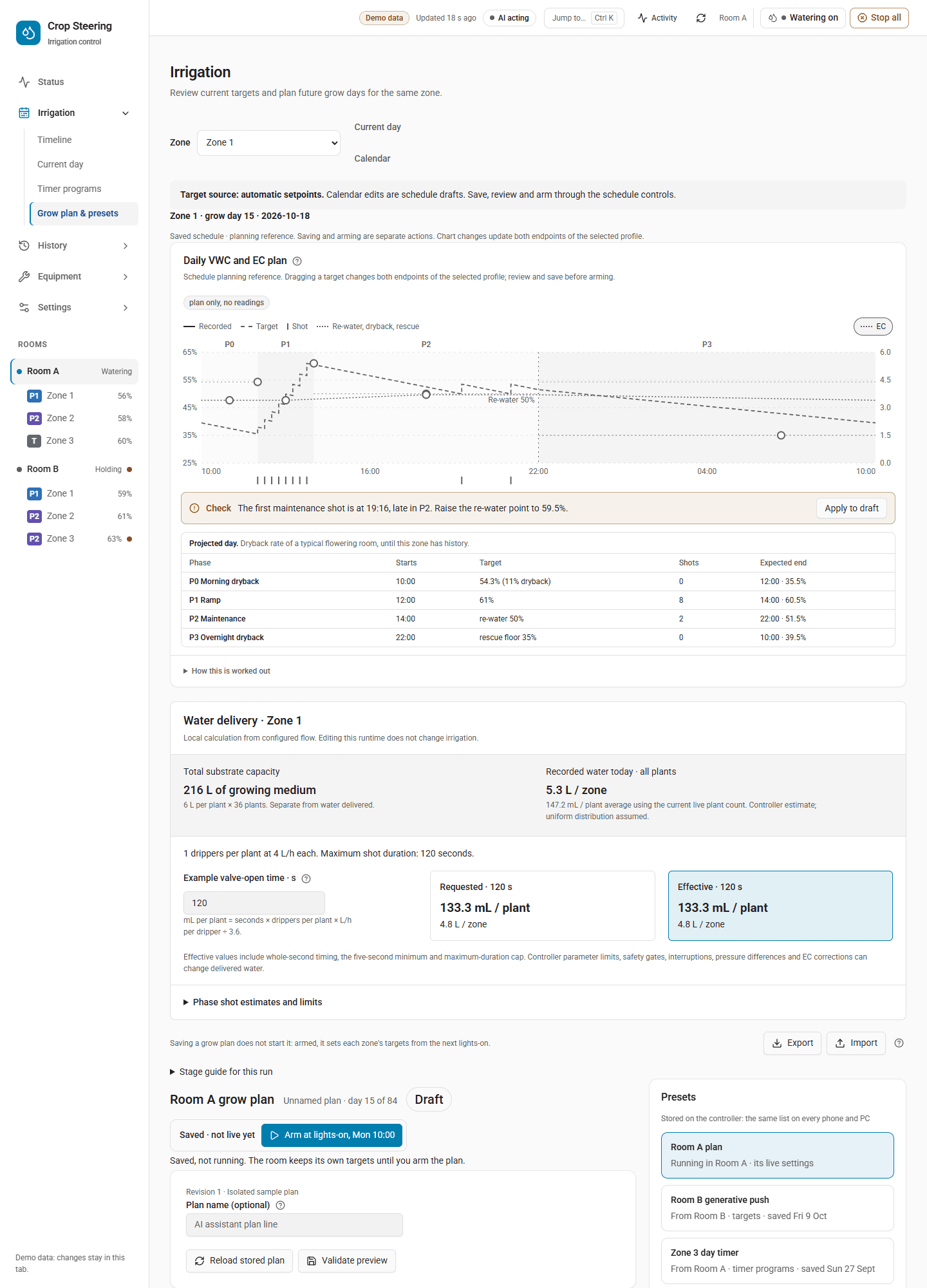
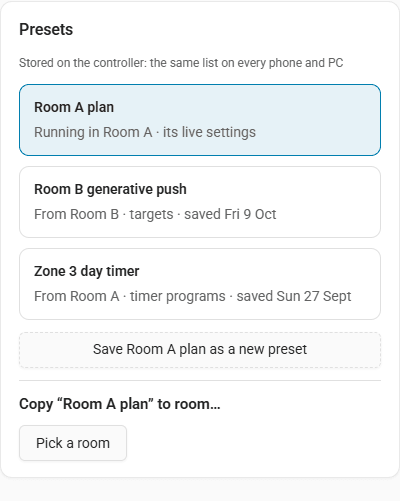
The Presets panel sits beside the grow planner in Irrigation › Grow plan & presets
(#/plan/schedule).
- The cards list the room's live plan first ("Running in Room A · its live settings"), then each stored preset with its source, scope and save date. Pick the one to copy from.
- Save Room A plan as a new preset saves the room's live targets, timing, water limits and timer
programs (scope
all) under the name you type. - Pick a room turns the room tree into a picker. Tick rooms or single zones, then Done. When you copy the room's live settings, that room and its zones are left out of the pick.
- The preview shows each change with the old value struck through and the new one beside it, and each setting under Not copied. If nothing differs it says "Room B already has these values."
- Copy N changes to Room B writes and reads back every value. The receipt says which values were written and read back, and which were refused and still hold their old value. If the source changed after the preview and other values were written, the receipt names them and claims nothing.
- Undo puts the journaled writes back one by one through
history_revert, newest first, and stops at the first one the controller does not confirm. It is offered only when every write held. After a partly refused copy the receipt offers no Undo, even for the writes that did land.
The dashboard saves room presets only. To save a zone preset, or to delete a preset, call the service (see below).
Presets made by the 3.18 update
The upgrade adds presets without applying any of them:
<room> – <stage> (from 3.17 recipe): one per recipe stage you had edited, with thetargets,phase_timingandwater_limitskeys it held. Recipe keys with no preset section are listed in the Upgrade report rowpresets.recipe_keys.<room> – before 3.18 update: the room's own settings as they were at the update, all four sections. Each zone's own settings are not included. If any of them could not be read, no snapshot is saved yet: the report rowpresets.snapshotasks you to save one yourself, and the step is tried again at the next start.
Deleting one of these does not bring it back on the next start. See 3.18 upgrade report, line by line.
Service examples
Save zone 3 of Room A as a preset:
action: crop_steering.preset_save
data:
  name: Flower week 3
  scope: all
  from: {room_id: "room:f2_", zone: 3}
  expected_revision: 4
Preview a preset on two zones of Room B, then apply it:
action: crop_steering.preset_apply
data:
  preset_id: 01JB7Q...
  to:
    - {room_id: "room:f1_", zone: 1}
    - {room_id: "room:f1_", zone: 2}
  preview: true
Copy targets and phase timing from Room A zone 3 to the whole of Veg:
action: crop_steering.copy_config
data:
  from: {room_id: "room:f2_", zone: 3}
  to: [{room_id: "room:veg_"}]
  sections: [targets, phase_timing]
  preview: true
Delete a preset:
action: crop_steering.preset_delete
data:
  id: 01JB7Q...
  expected_revision: 5
All four write services also take the common fields api, client and proposal_token. The MCP server
can preview and apply preset_apply and copy_config (see Configure Crop Steering through MCP); it cannot save or
delete presets.
Where it lives in the code
custom_components/crop_steering/presets.py: sections, capture, diff, key mapping, writes and read-back.custom_components/crop_steering/site_api.py: the preset store and the services.custom_components/crop_steering/admin.py: the admin check (async_require_admin).custom_components/crop_steering/migration.py: therecipe_presets:v1andsnapshot_preset:v1upgrade steps, which report as Upgrade report rowspresets.recipe,presets.recipe_keysandpresets.snapshot.frontend/src/components/presets-panel.tsxandfrontend/src/lib/presets.ts: the dashboard panel.