System status
Applies to release 3.18.1 · View source at the tag · Markdown
On this page
Bottom line: Settings › System status shows, on one page, every device your rooms' setups map,
whether each one is online, when it last reported and how much of the last 7 days it was online,
plus each room's controller heartbeat and the software versions in use. The same numbers come from
the crop_steering.system_status_get service and the site-wide sensor.crop_steering_system_health
sensor. Nothing on this page, in the service or in the sensor changes irrigation. Only the
Acknowledge button on an alert writes anything, and that write is read back.
Getting there
- In the dashboard menu: Settings › System status (route
#/settings/system). - The page polls
system_status_getevery 30 s. The time of the last good read is shown as Checked HH:MM. If a later poll fails, the page says so and keeps showing the last good read, with a Read again button. - Capabilities › at the top right opens the read-only features inventory (
#/settings/features).
What the page shows
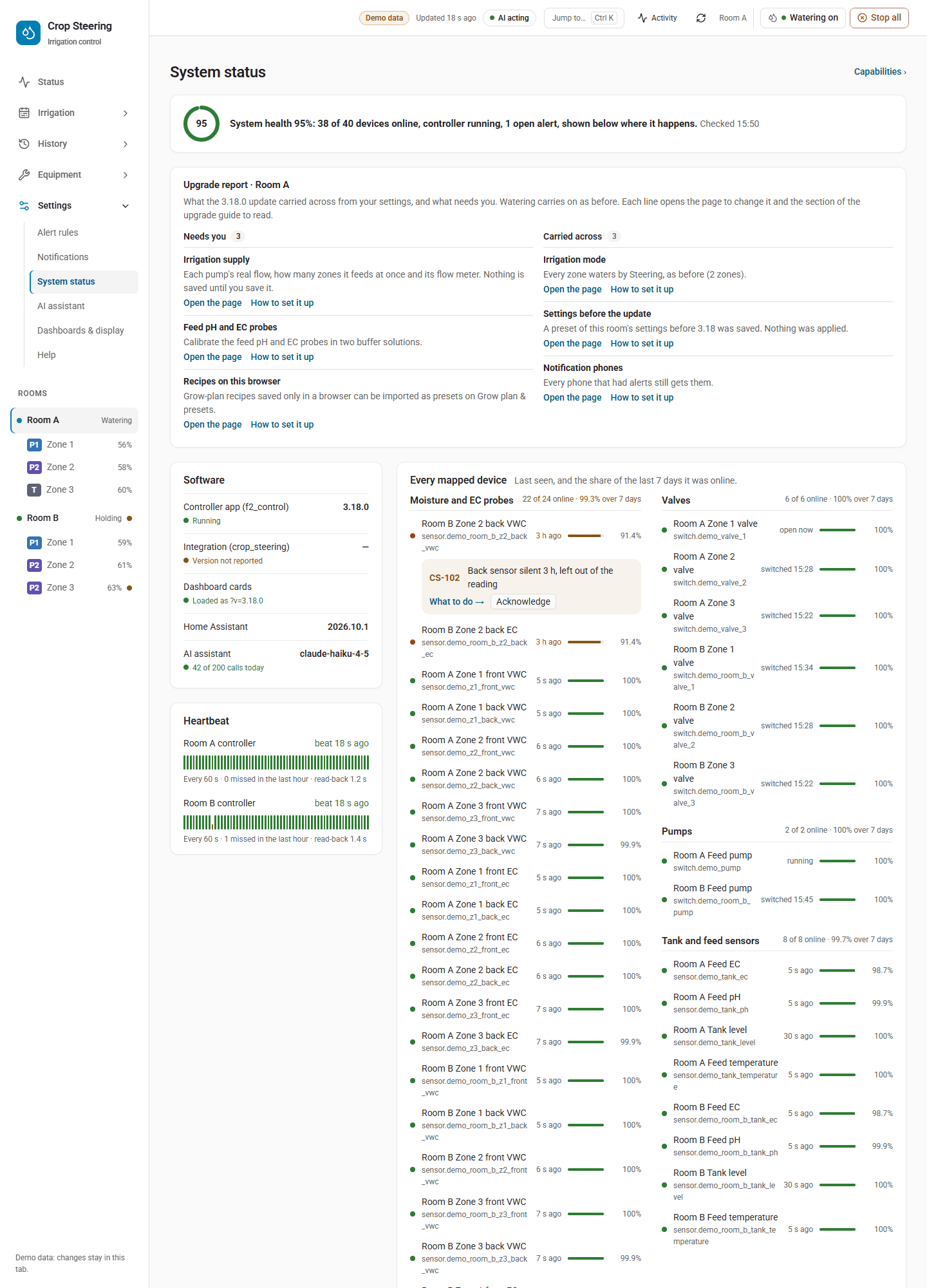
Health line
A ring with the site's percent online and one sentence, for example:
System health 94%: 34 of 35 devices online, controller running, 3 open alerts, each shown below where it happens.
If the site's controller is running but one room's controller is not, the sentence says "controller not reporting in 1 of 2 rooms". Open alerts that do not belong to a single device are listed under their room's name here.
Software
| Row | What it shows |
|---|---|
| Controller app (f2_control) | Its version, and Running, Not reporting or No heartbeat. |
| Integration (crop_steering) | Its version, and whether it matches the controller's version. A mismatch reads "The controller runs X". |
| Dashboard cards | The ?v= of the registered Lovelace resource whose URL contains crop_steering, or "Card version not reported". |
| Home Assistant | The running Home Assistant version. |
| AI assistant | The model, and calls today against the daily budget (from sensor.crop_steering_<prefix>jev). |
Controller and AI-service alerts (CS-602, CS-609, CS-610, CS-706, CS-708, CS-709) are shown on this card.
Heartbeat
One strip per room for the last hour of the controller's heartbeat
(sensor.crop_steering_<prefix>ai_heartbeat). The controller is expected to beat every 60 s. Missed
beats show as gaps, and the note under the strip reads, for example, "Every 60 s · 2 missed in the
last hour". The integration also reads a readback_ms attribute from each beat, and the note would
add the read-back time, but the controller does not write that attribute, so in practice it is not
shown.
The heartbeat record is kept in memory, the last 120 beats per room. After a Home Assistant restart the strip covers only the minutes since then ("the last 14 min"), or says "no beats recorded since Home Assistant started".
Every mapped device
Devices are grouped as Moisture and EC probes, Valves, Pumps (pump and flow meters) and Tank and feed sensors. Each group header says "N of M online" and, when the recorder has data, the group's mean 7-day uptime. Each row shows:
- a dot: green when online; orange for a zone or feed probe (
probe_vwc,probe_ec,probe_temp,feed_probe) that is online but last reported over 2 min ago, or whose last report time is unknown; red when the device is not online. A red zone or feed probe reads "silent"; every other red row, including the tank's EC, pH, temperature and distance sensors, reads "not available". Red rows sort first. - the room and device name, and its entity ID.
- last seen: "4 s ago" for probes, sensors and flow meters; "open now", "running" or "switched 13:58" for valves, the pump and the main line.
- a bar and percent for 7-day uptime. The bar is marked when uptime is below 95 %. "—" means the recorder has nothing for that entity.
Open alerts are placed on the device they concern: a moisture or EC code (CS-1xx) on that zone's probe, the silent one first; a valve, pump or main-line code (CS-3xx) on that device; zone codes CS-701, CS-702 and CS-710 on the zone's valve and CS-703 to CS-705 on its probe; tank, stock and dosing codes (CS-8xx, CS-9xx, CS-608) on the Tank and feed sensors card, except CS-810 and CS-811 (lights dimmed), which go in the room's header. A tank-card alert also goes in the room's header when the room has no Tank and feed sensors group. An alert that names its own entity sits on that entity's row.
Acknowledging an alert
Each alert card has What to do → (opens Help for that code) and, when the alert is in the room's
journal, Acknowledge. Acknowledge calls crop_steering.alert_ack. Any signed-in Home Assistant
user can acknowledge; an administrator is not needed. The alert leaves the room's open alerts
(sensor.crop_steering_<prefix>alerts_open) and is journaled as alert.acknowledged with who did
it. When the write is read back, the page says "CS-xxx acknowledged. Written and read back HH:MM."
Acknowledging does not fix the cause, and a threshold rule's own sensor stays on until its value is
back in range.
Which devices are listed
For each loaded room, everything its setup maps, each entity once:
Kind (kind) | Source in the room setup | Held to the silent-probe rule |
|---|---|---|
probe_vwc | each zone's vwc_sensors (or vwc_front / vwc_back) | yes |
probe_ec | each zone's ec_sensors (or ec_front / ec_back) | yes |
probe_temp | each zone's substrate_temperature_sensor | yes |
valve | each zone's zone_switch | no |
pump | pump_switch | no |
main_line | main_line_switch | no |
feed_probe | feed_ec_sensor, feed_ph_sensor | yes |
tank | tank_distance_sensor, tank_temperature_sensor, tank_ec_sensor, tank_ph_sensor | yes |
tank | water_level_sensor, tank_low_float | no |
flow_meter | the zone meters set in the site supply (zone_meters) | no |
Dosing pumps are not listed.
Online, offline and silent
- Offline (not available): the entity is missing,
unknownorunavailable. This applies to every kind. - Silent: a probe (see the table) that is available but has not reported within its own limit,
max(180 s, 3 × the median of its last 12 report intervals). A probe that reports every 5 min is allowed 15 min; a probe that reports every 30 s is allowed 180 s. A probe repeating the same value still counts as reporting: the integration listens for both state-changed and state-reported events and useslast_reportedwhere Home Assistant provides it. - Until two reports of a probe are known, its limit is 900 s. Report times are kept in memory, so this applies again for a short while after every Home Assistant restart.
- Valves, the pump, the main line, the tank level sensor, the low float and flow meters only change when something happens, so they are online while available, however old their last change.
7-day uptime
uptime_7d_pct is the share of the last 7 days the entity spent neither unknown nor
unavailable, read from Home Assistant's recorder. For an entity first recorded less than 7 days
ago, it is the share of the time since its first record, so a new install shows its real uptime
rather than a low number. Each entity is read at most once an hour. Without the recorder, or with
nothing recorded, the value is null (shown as "—"), and the integration logs once at info level
that 7-day uptime is not known. Uptime measures availability only: a probe can be silent now and
still show high uptime.
Controller: running, stale, absent
Per room, from sensor.crop_steering_<prefix>ai_heartbeat:
- running: the heartbeat entity exists, its state is not
unavailable,unknown,noneor empty, and it was updated less than 10 min ago. This is the same rule as theengine_offlineRepairs check. - stale (shown as "not reporting"): the entity exists but is dead or older than 10 min.
- absent (shown as "no heartbeat"): the entity does not exist.
The site's controller state is the best of its rooms', and the controller version shown comes from
that room's heartbeat (controller_version attribute). Use the per-room Heartbeat strips to find a
room whose controller has stopped.
sensor.crop_steering_system_health
One sensor for the whole site.
| Field | Meaning |
|---|---|
| State | Percent of mapped devices online, unrounded; unknown when no devices are mapped. Unit %. |
pct_online | The same number. |
silent | Sorted entity IDs of every device not online (offline or silent). |
controller | running, stale or absent. |
addon_version | The controller version from the best room's heartbeat. |
Only the room that loaded first (the owner) publishes it: immediately when a room loads, again 60 s after a room's load and on each 5-min health check, and whenever a room loads or unloads. If that room unloads, the next one takes over. When the last room unloads, the sensor and the service are removed.
Example automation trigger:
trigger:
  - platform: numeric_state
    entity_id: sensor.crop_steering_system_health
    below: 90
    for: "00:10:00"
crop_steering.system_status_get
Read-only and response-only, with no administrator check. It takes no fields of its own; the common
API fields api, client and proposal_token are accepted (see the API v2 envelope). It refreshes
the uptime cache before answering. Answer shape without api: 2 (values are examples):
{
  "controller": "running",
  "addon_version": "3.17.0",
  "pct_online": 97.1,
  "ha_version": "2026.10.1",
  "card_version": "3170",
  "ai": {"calls_today": 12, "daily_budget": 48, "pct_used": 25.0, "model": "example-model"},
  "rooms": [
    {
      "room_id": "room:f2_",
      "pct_online": 96.0,
      "alerts_open": 1,
      "controller": "running",
      "entities": [
        {
          "entity_id": "sensor.f2_z1_vwc_front",
          "kind": "probe_vwc",
          "name": "Room A Z1 VWC front",
          "zone": 1,
          "last_seen": "2026-10-23T02:14:05+00:00",
          "last_change": "2026-10-23T02:14:05+00:00",
          "ok": true,
          "uptime_7d_pct": 99.8
        }
      ],
      "groups": [{"kind": "probe_vwc", "entities": []}],
      "heartbeat": {
        "last_beat": "2026-10-23T02:14:30+00:00",
        "age_s": 12.4,
        "controller": "running",
        "interval_s": 60,
        "beats": [
          {"at": "2026-10-23T02:05:00+00:00", "missed": true, "readback_ms": null, "gap_s": 190.0},
          {"at": "2026-10-23T02:13:30+00:00", "missed": false, "readback_ms": null}
        ]
      }
    }
  ]
}groupsholds the same entity rows asentities, grouped bykindin the order of the table above (shortened here).aiis site-wide: it comes from the first loaded room that has asensor.crop_steering_<prefix>jev, and isnullonly when no room has one.card_versionisnullwhen the Lovelace resources cannot be read, when no resource URL containscrop_steering, or when the first such resource has no?v=(later matches are not checked).alerts_openis the state of the room'salerts_opensensor, ornull.- A missed beat is added when the gap between two beats exceeds 2 × 60 s. It sits one interval
after the last beat and carries the whole gap in
gap_s. - The MCP server exposes this as the read-only tool
get_system_status.
Older integrations
When the system_status_get service is not there (the call comes back as missing), the page builds
the same view from entity states: zone probes and valves, the pump and the main line only, with a
probe online while it reported in the last 15 min. The page does not check version numbers; it falls
back only on the missing service. In this mode the 7-day uptime and Heartbeat panels say they need
the newer integration. The Software card stays, with Home Assistant shown as "—" and Dashboard cards
as "Card version not reported"; the AI assistant row is still filled from the jev sensor.
Acknowledge then reports that the integration cannot acknowledge alerts yet.
Troubleshooting with this page
- Red probe, "silent". The probe is available but stopped reporting at its usual rhythm. Check its device (power, Wi-Fi, ESPHome log) before treating the probe as faulty. The zone's own CS-1xx alert, if any, sits on the same row.
- Red valve, pump or main line, "not available". Home Assistant cannot reach the switch, and a shot needs it. Check the relay board or the integration that provides the switch.
- Heartbeat "not reporting" or "no heartbeat". The controller app is stopped, restarting or
cannot post to Home Assistant. Check the app's log in Home Assistant. The
engine_offlineRepairs card is raised on the same 10-min rule. - Integration and controller versions differ. Update the one that is behind: the integration
first, then the controller (see
UPGRADING.md). - Low 7-day uptime but online now. The device dropped out recently. Look at its history in Home Assistant for the gaps.
- "—" for uptime everywhere. The recorder is not running, or excludes these entities.
Related: ERROR_CODES.md for each CS code, NOTIFICATIONS.md for who is told about alerts,
troubleshooting.md for fixes by symptom.