Upgrade to 3.18: the plan
Applies to release 3.18.1 · View source at the tag · Markdown
On this page
Bottom line. 3.18 is the biggest update Crop Steering has had. Your zones keep watering and dosing by the same targets and limits, with one new safety hold (see What stays the same), but almost every page of the dashboard is new and a long list of new features waits for you to set them up. Do not update a room that is in a grow unless you have a few clear hours for a configuration session afterwards, and never update in the hour before lights-on.
This page is the plan for the day you update: what the update carries across, what it leaves for you, a first-hour checklist, and how to go back. The per-item detail (fields, services, safe defaults) lives in 3.18 upgrade report, line by line, one section per line of the Upgrade report.
What stays the same
The update is written so that a room waters the same before and after it, until you change something. Its rules:
- Watering and dosing keep their settings. Every zone keeps watering by steering, with the same
targets, phases, shot sizes and limits. Tests replay one controller pass on two recorded rooms (one
3.11.1, one 3.17.0) before and after the update and check the same valves open; that proves sameness
for those two rooms, not for every setup. Two behaviours are new:
- A fail-closed source-water hold. On any pass where one of the room's irrigation pH/EC limit
numbers (
number.crop_steering_<prefix>irrigation_{ec,ph}_{min,max}) reads unavailable, unknown or not a number, the room holds watering with "source-water EC band unreadable (<entity>) — holding (fail-closed)" (or the pH equivalent). 3.17 had no such hold. A limit number Home Assistant does not have at all still counts as no limit, as before. - A probe-less room with no feed EC to fall back on. If a room has no feed EC probe, no recipe feed EC and no ledger fallback (for example because the migration ledger failed to load), the controller turns EC flushing off and says so with CS-907, where 3.17 assumed a 3.0 mS/cm feed.
- A fail-closed source-water hold. On any pass where one of the room's irrigation pH/EC limit
numbers (
- Nothing that waters or doses is switched on. The update saves no pump supply, no timer program, no active alert rule, no pump calibration and no feed-probe calibration.
- Old data is never deleted. The recipe store, notification recipients, setting log, calibration records and dosing setup are read, never rewritten. That is what makes going back possible.
- It runs once per room. A ledger (
crop_steering.migrationstore) records each step. A step that failed is tried again at the next start; a done step never runs again. - Nothing is guessed. What the update could not carry without a guess (a pump's real flow, a probe's calibration, your EC unit) goes on the room's Needs you list instead.
A room set up fresh on 3.18 has no Upgrade report at all.
What the update carries across
| Report row | What it did |
|---|---|
irrigation.mode | Every zone shows Watering by: Steering, as before (select.crop_steering_<prefix>zone_<n>_irrigation_mode). Nothing is written; a zone switched off by switch.crop_steering_<prefix>zone_<n>_enabled stays off. |
presets.recipe | Each 3.17 recipe stage you had edited became a preset named <room> – <stage> (from 3.17 recipe). Untouched default stages are skipped, and so is an edited stage none of whose settings fits a targets, phase timing or water limits section (those settings are listed under presets.recipe_keys instead). The recipe itself still works. Nothing is applied. |
presets.snapshot | A preset named <room> – before 3.18 update holds the room's targets, phase timing, water limits and timers as they were after the restart. It is your point to go back to. Nothing is applied. |
units.temperature | Where Home Assistant uses °F, the dashboard shows °F. Display only. |
notify.recipients | Every notification recipient (phone, alert kinds, rooms, digest) is kept as it was. |
dosing.ph_pumps | pH up and pH down pumps keep their pH role. The dosing setup is not changed. |
history.import | Earlier setting changes, stock moves, calibration records and overlays are added to the new event journal, so History shows them beside everything from now on. The controller adds its own dosing history and AI records once it is updated. |
Preset names are cut short where needed so the whole name fits 60 characters; with a long room or stage name the end of the name may be missing.
Every preset or display setting the update saved is recorded in the journal as a change by the system
(detail migration:<step>), so it shows in History › Changes like any other change.
What needs you
These rows appear on the room's Needs you list. None of them is needed to keep watering as before; each one turns on something new. Do the first three before you change anything else.
| Report row | What to do | Where |
|---|---|---|
feed.ec_fallback | This room has no feed EC probe. 3.17 assumed a 3.0 mS/cm feed for its EC flushes and high-EC holds. The update keeps that 3.0 for this room only, and the controller says so with CS-907 ("The feed EC is unknown: the old 3.0 mS/cm is assumed"). Map a feed EC probe or set the feed recipe's EC and the fallback ends by itself. | Equipment › Setup: pumps & valves (hardware.feed_ec_sensor) or Equipment › Feed & dosing |
presets.snapshot (needs you) | Some settings could not be read at the restart, so no rollback preset was saved. Save one yourself before you change anything. | Irrigation › Grow plan & presets |
entities.retired | An automation or script uses an entity Crop Steering no longer reads. Settings › Repairs names each one (CS-614). Fix it, or the automation silently does nothing. | HA Settings › Repairs |
supply.pumps | The update found each room's pump and main line but did not save a supply. Saving one turns on pump sharing: rooms on one pump take turns, and a long wait raises CS-214. Measure the pump's real flow first. | Equipment › Setup: pumps & valves › Supply |
calibration.feed_ph, calibration.feed_ec | Each feed probe reads raw, as before. The 2-point calibration is new. | See Calibration pages |
dosing.pump.<id> | Each pump that has neither a pH role nor a solution yet: pick its solution and run a pump calibration. Pumps that already have a solution are not listed. Until then it doses from its flow sensor, as before. | Equipment › Feed & dosing |
presets.recipe_keys | A recipe setting fits no preset section and was not copied. Set it on the room's settings if you use it. | Irrigation › Grow plan & presets |
irrigation.mode (needs you) | A zone shows no irrigation mode. Pick Steering to keep it as it was. | Status › All rooms |
units.ec | EC is shown in mS/cm. Pick ppm 500 or 700 if you prefer. Display only. | Settings › Dashboards & display |
units.clock | Listed only where Home Assistant uses °F. Times are shown on a 24-hour clock; pick a 12-hour clock if you prefer. Display only. | Settings › Dashboards & display |
notify.quiet_hours | Quiet hours are new and off for every phone. Optional. The row links to Settings › Notifications, but that page has no quiet-hours control in this build; they can only be set on a recipient through the integration's notification services. | Settings › Notifications (link only) |
alerts.rules | There are no custom alert rules. Your irrigation pH and EC limits still stop watering as before. Optional. | Settings › Alert rules |
panels.new | Camera, CO2 and light-level panels show once their entities are mapped. Dashboards can be made from templates. Optional. | Equipment › Setup: pumps & valves; Settings › Dashboards & display |
Grow-plan recipes saved "on this browser" before 3.18 stay in that browser. They are not presets and are never imported without you. Export them as a backup from Irrigation › Grow plan & presets.
Reading the report
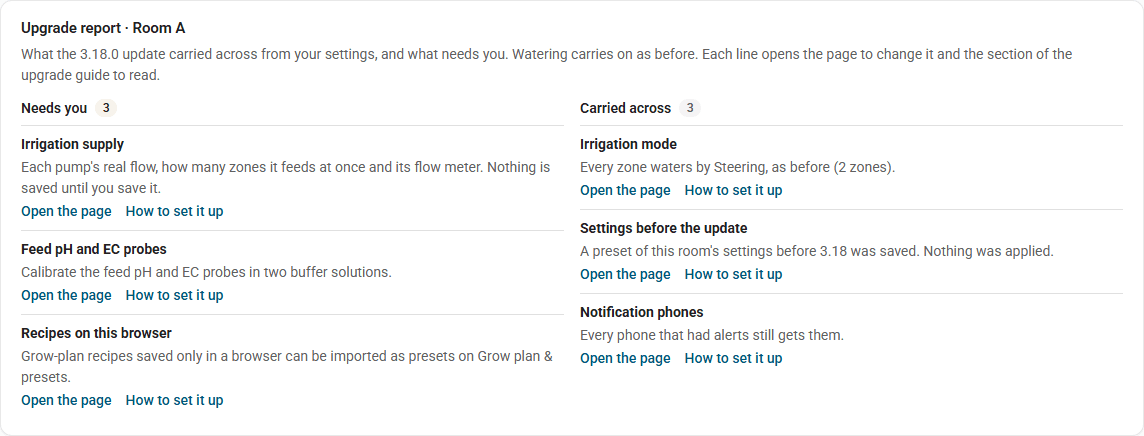
The report is in three places:
- HA Settings › Repairs: one card per room, "Crop Steering 3.18: Upgrade report (CS-616)". It is raised only when the room has at least one Needs you row. Its fix flow, Mark as read, closes it for good.
- The dashboard: Settings › System status shows each room's report above the Software panel, Needs you beside Carried across, each line with a link to its page and to its section of 3.18 upgrade report, line by line (picture above). It reads the same service, so it stays there after you mark the Repairs card as read.
- The service
crop_steering.migration_report. In HA, open Developer tools › Actions, pick Crop Steering: Read the upgrade report, setroom_idand run it with the response shown:
action: crop_steering.migration_report
data:
  room_id: "room:f2_"   # "room:" for the default room, "room:<prefix>" for a named room
It answers {schema_version, release, room_id, acknowledged, carried: [...], needs_you: [...]}, where
release is "3.18.0" and acknowledged is when the report was marked as read (or null). Each row has id, title, status, detail, a
dashboard page and a doc link into 3.18 upgrade report, line by line. It changes nothing and needs no
administrator. You can hand it, with UPGRADING.md, to an AI assistant to work through one row at a time.
Calibration pages
Equipment › Prime & calibrate a pump primes a dosing pump's line while you hold the button, runs it for a measured time and saves the mL/min you measured. Equipment › Feed pH/EC calibration walks a feed probe through two buffer solutions and applies the correction only when you commit it. Nothing changes until a calibration is committed, so leaving these rows open until you have the buffers and a measuring cylinder is safe. In full: Calibration.
Before you update
- Pick a time with a few hours to spare, away from lights-on and away from a planned phase change.
- Take a Home Assistant backup that includes the Crop Steering Controller app (it holds the
controller's
/data). This backup is how you go back. - Write down which rooms' Watering kill switches are on. A named room, or a default room made by the
setup wizard, uses
switch.crop_steering_<prefix>engine_enabled, shown as "Engine Enabled (kill switch)". A default room from before the setup wizard has no such switch; its kill switch is the helper you made by hand,input_boolean.f2_control_enabled. - Export any grow-plan recipes saved on this browser.
- If a grow plan is armed, know that going back to 3.17 later means disarming it first (see Going back).
The update, in order
Integration first, then the controller. The controller sends its journal history to the integration; if the controller updates first, it holds that history and resends it once the integration is ready.
- Set each room's Watering kill switch off (the engine switch or
input_boolean.f2_control_enabled, see Before you update step 3). Wait until the pump, main line and valves read off. - HACS → Crop Steering → download 3.18. Restart Home Assistant. (Check the release you pick is the parity
release: its Upgrade report says
release: "3.18.0". In this build the integration manifest and the controller app still carry the version string 3.17.0.) - Check each Crop Steering room loads (HA Settings › Devices & services, no error on the entry).
- Update Crop Steering Controller in place from the app store. Do not install a second copy.
- Start the controller with the kill switches still off. Check its log, version and heartbeat.
- Set the kill switches back to how they were.
The install guide has the full general procedure.
First hour checklist
Work through this with the room's kill switch back on. Each item is a read, not a change, unless it says otherwise.
- Watering looks as before. Irrigation › Timeline shows today's shots and the next planned ones per zone. The first shot after the update fires when it would have on 3.17.
- No new hold. If a room shows "source-water EC band unreadable
(number.crop_steering_irrigation_ec_min) — holding (fail-closed)" (or
_ec_max, or the pH equivalent), the controller could not read that limit number. This hold is new in 3.18. It has no grace period: it fires on any pass where the number reads unavailable, unknown or not a number, during startup or at any later time, and lifts on the first pass where the number reads again. If it does not clear, check the integration loaded (step 3 above) and that the named number entity has a value. - Devices are online. Settings › System status lists every mapped probe, valve, pump and meter as online, offline or silent, plus each room's controller heartbeat. Fix anything offline before setting up new features.
- Read the Upgrade report for every room (Repairs or
crop_steering.migration_report). - Feed EC fallback. If the room lists
feed.ec_fallback, expect CS-907 on the controller. That is the old behaviour, kept on purpose. Plan to map a feed EC probe or set a recipe feed EC. - Rollback preset exists. Irrigation › Grow plan & presets lists
<room> – before 3.18 update. If the report says it could not be saved, save a preset of the room yourself now. - Retired entities. Clear any CS-614 card in Repairs by fixing the automation it names.
- History came across. History › Changes shows your earlier setting changes; History › Explorer shows today's readings with shot and phase lanes.
- Units. Check temperature and EC read the way you work (Settings › Dashboards & display). Display only: what the controller uses never changes.
- Notifications still arrive. Settings › Notifications → send a test push to your phone.
Stop here if the hour is up. Everything after this is new setup and can wait.
The configuration session
Do these one at a time, and check each on the Timeline or System status before the next. Timer programs, alert rules and presets show a review before saving and read the value back after. The Supply editor shows a review but does not read the value back, and Dashboards & display saves each row as you change it, so check those on the page after saving.
- Supply (Equipment › Setup: pumps & valves). Time a bucket at the far zone to get the pump's real litres per hour. Start with one zone at a time per pump, as it ran before. Only then save.
- Feed probes and dosing pumps, once their calibration pages are built.
- Presets. Save the settings you like as presets; use copy with its preview to spread them to other zones or rooms.
- Timer programs, only if a zone should run on a timer instead of steering.
- Alert rules. A rule only notifies; it never touches watering. Use its replay of yesterday before saving. (Quiet hours have no dashboard control in this build.)
- Dashboards from templates, for a wall or tablet screen.
Going back
You can return to 3.17.0. The update deleted nothing, and 3.17.0 has no code for the stores 3.18 added (the journal, presets, supply, timer programs, alert rules, the migration ledger). One exception is not yet checked: quiet hours are saved on recipient rows inside the old notification store, which 3.17.0 does read. Whether 3.17.0 tolerates that extra field is unverified, so clear quiet hours before going back.
- If a grow plan is armed, disarm it first and check the room has handed over to its manual targets. Installation, upgrade and rollback warns that an older controller cannot read a newer active plan.
- Set each room's Watering kill switch off (engine switch or
input_boolean.f2_control_enabled). Wait until the pump, main line and valves read off. - Integration: HACS → Crop Steering → Redownload → pick 3.17.0 → restart Home Assistant.
- Controller: restore the Crop Steering Controller app from the backup you took before the update. Check its version, counters and phases after the restore.
- Set the kill switches back to how they were.
What you lose by going back:
- Anything set up only in 3.18: supply, timer programs, alert rules, presets, quiet hours, probe offsets, committed feed or pump calibrations, dashboards made from templates. 3.17.0 does not read them, so a zone set to timer mode goes back to steering and corrected feed readings go back to raw.
- The feed EC fallback stays in the ledger but 3.17.0 does not need it: it assumes 3.0 mS/cm on its own.
If you update to 3.18 again later, the ledger remembers which steps already ran, so the update does not copy your recipes or save a second rollback preset.
Related
- 3.18 upgrade report, line by line: one section per Upgrade report row, with services and fields.
- Installation, upgrade and rollback: install, upgrade and restore in general.
- Error codes: CS-214, CS-614, CS-616, CS-907.
- Set up an install with an AI assistant: let an AI assistant prepare the configuration session for you to approve.
- The new features in full: water supply, timer programs, presets, alerts and quiet hours, calibration, history and changes, system status, dashboards and display.